Minecraft Skin Format Explained
How Minecraft skins work: file dimensions, overlay layers, and player models.
64x64 vs Legacy 64x32
Modern Minecraft skins use a 64x64 pixel PNG image. This format was introduced in Minecraft 1.8 and supports overlay layers on all body parts (head, body, arms, and legs).
The older 64x32 pixel format (pre-1.8) is still supported but only includes overlay layers for the head (hat layer). The bottom half of the image simply did not exist, so legs and arms shared textures from one side.
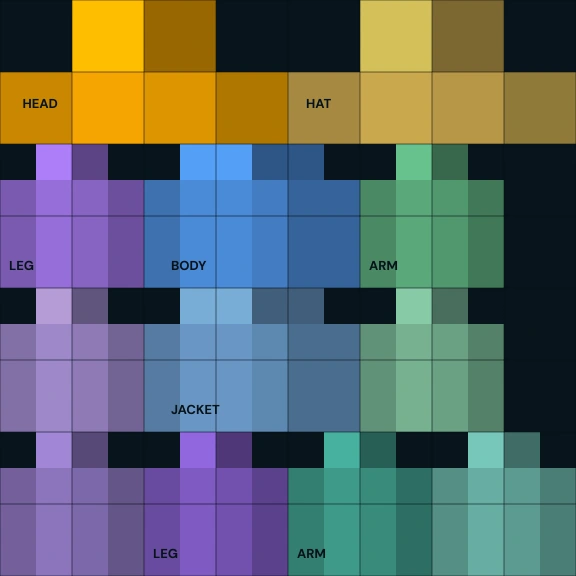
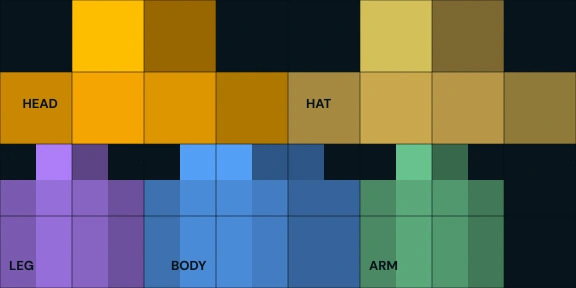
| Feature | 64x64 (Modern) | 64x32 (Legacy) |
|---|---|---|
| Dimensions | 64 x 64 pixels | 64 x 32 pixels |
| Head overlay | Yes | Yes |
| Body overlay | Yes | No |
| Arm overlays | Yes (both arms) | No |
| Leg overlays | Yes (both legs) | No |
| Unique left/right | Yes | No (mirrored) |
| Alex model | Supported | Not supported |
Steve vs Alex Models
Minecraft has two player models that differ in arm width:
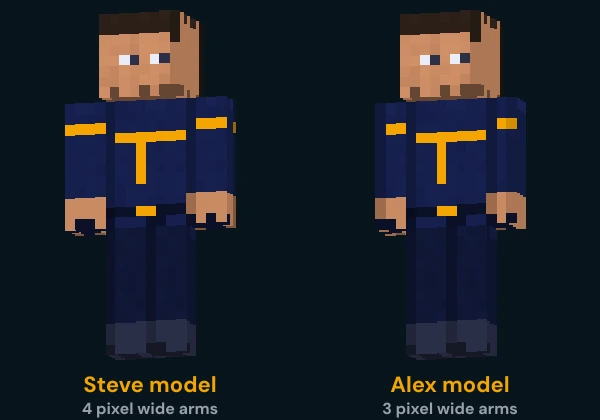
Steve Model (Classic)
- 4-pixel wide arms
- The original and default model
- Slightly broader, blockier appearance
- Arm texture area: 4x12x4 pixels
Alex Model (Slim)
- 3-pixel wide arms
- Added in Minecraft 1.8
- Slimmer, more refined look
- Arm texture area: 3x12x4 pixels
When uploading a skin through the Minecraft Launcher, you must select the correct model (Classic or Slim). Using a Steve skin on the Alex model or vice versa will cause visual artifacts on the arms.
Overlay Layers
Each body part has two layers: a base layer and an overlay layer. The overlay layer floats slightly outside the base layer and can be used for accessories like hats, jackets, sleeves, or pants details.
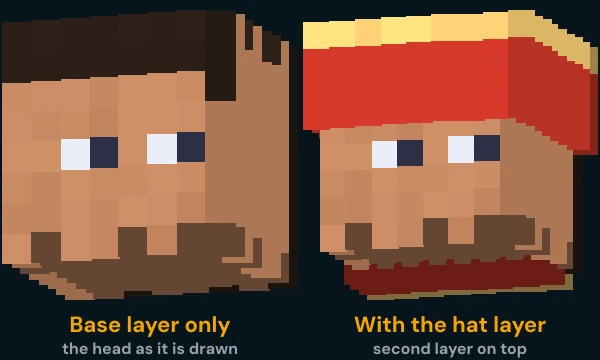
| Body Part | Base Layer | Overlay Layer |
|---|---|---|
| Head | Head texture (face, ears, etc.) | Hat / hair overlay |
| Body | Torso / shirt | Jacket / vest layer |
| Right Arm | Bare arm / sleeve | Sleeve detail overlay |
| Left Arm | Bare arm / sleeve | Sleeve detail overlay |
| Right Leg | Pants / leg base | Pants detail overlay |
| Left Leg | Pants / leg base | Pants detail overlay |
Overlay pixels can be fully transparent to show the base layer beneath, and since Java Edition 1.9 they can also be partly see-through. The base layer works differently: Java Edition draws every base layer pixel fully opaque, whatever alpha the file gives it. Bedrock Edition hides any pixel with an alpha of 25 or less, on either layer.
File Requirements
- 1.File format must be PNG (no JPEG, GIF, or other formats)
- 2.Dimensions must be exactly 64x64 or 64x32 pixels, and Bedrock Edition also accepts 128x128
- 3.The file itself doesn't say which arm width it has: you choose classic (4 pixel arms) or slim (3 pixel arms) when you upload it
- 4.In Java Edition transparency only works on the overlay layer; the base layer is always drawn opaque
- 5.Unused areas of the skin template should be transparent or left as-is