Astro Builder
Overview & Design
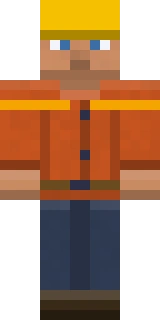
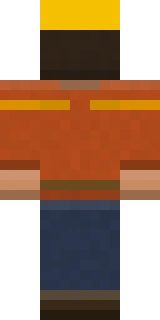
Astro Builder is the construction outfit of the Astroworld line. It pairs a slate-blue work shirt with a tan tool belt and a safety-yellow hard hat, with rolled sleeves and gloves that read as someone mid-project rather than mid-battle. The tool belt detail wraps the body texture so it stays present from behind, and the colour split keeps the hard hat as the focal point. It is the natural skin for players who spend their evenings on megabuilds.
It suits builders, redstone engineers and anyone running large construction projects on the server.
- Category
- Astroworld
- Colour palette
- slate blue, safety-yellow and tan
- Model type
- Steve (classic, 4px arms)
How to Use Astro Builder
Astro Builder works in both editions of Minecraft. Download the Steve (classic, 4px arms) PNG with the button above, then follow the steps for your edition.
Java Edition
- 1Click Download Skin above to save Astro Builder as a 64x64 PNG to your device.
- 2Open minecraft.net, sign in, and go to your profile under Skins (or use the Skins tab in the official launcher).
- 3Choose Upload Skin, pick the PNG, and set the model to Steve (classic, 4px arms).
- 4Save the change and start Java Edition. Only an account that owns Minecraft can change its skin.
Bedrock Edition
- 1Download Astro Builder with the button above. Bedrock imports skin files in the Windows version and on phones and tablets.
- 2Start Bedrock Edition and open the Dressing Room from the main menu.
- 3Go to the Classic Skins tab and import the PNG from your files or photo gallery.
- 4When the game asks which model the skin uses, choose classic, with arms four pixels wide.
Tips & Pairings
Matching capes
These official Minecraft capes complement the slate blue, safety-yellow and tan of Astro Builder:
- Mojang Office Cape — Very Rare
- 15th Anniversary Cape — Common
Similar styles
If you like Astro Builder, these skins share a similar vibe from other categories:
- Iron Knight — medieval
- Village Blacksmith — medieval
- Royal Archer — medieval
Frequently Asked Questions
What is the Astro Builder skin meant to represent?
It represents the builder spirit of the Astroworld community: a slate-blue work shirt, a tan tool belt and a safety-yellow hard hat, styled for construction rather than combat.
Does the Astro Builder skin have a hard hat?
Yes, the head texture is built around a safety-yellow hard hat, which is the focal point of the design and distinguishes it from the other Astroworld outfits.
Is the Astro Builder Minecraft skin free to download?
Yes. Every skin in the Astroworld gallery is free to download and use in both Java and Bedrock Edition. Just press the Download Skin button to save the PNG.
How do I install this skin in Minecraft Java Edition?
Download the PNG, then on minecraft.net or in the official launcher open your profile, choose Upload Skin, select the file and set the model to Steve (classic, 4px arms). Only an account that owns Minecraft can change its skin.
How do I use this skin on Minecraft Bedrock Edition?
In the Windows version or on a phone or tablet, open the Dressing Room, go to the Classic Skins tab and import the downloaded PNG. Choose Steve (classic, 4px arms) when the game asks for the model.
Made for Astroworld MC — download and use this skin on our server at play.astroworldmc.com


