Iron Knight
Overview & Design
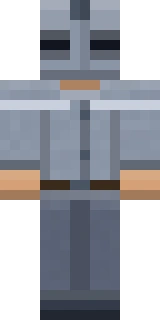
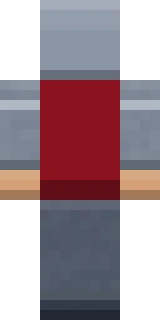
Iron Knight is full-plate from collar to boots, rendered in steel grey with darker gunmetal shading worked into the joints so the armour reads as layered rather than flat. A dark visor hides the face for an anonymous, intimidating presence, and a crimson cape pattern falls down the back panel to break up the metal and give the silhouette movement. The plating is detailed to catch light along the chest and pauldrons, which makes it pop in PvP arenas.
It suits PvP players, arena fighters and anyone who wants a heavily armoured, faceless warrior look.
- Category
- medieval
- Colour palette
- steel grey, gunmetal and crimson
- Model type
- Steve (classic, 4px arms)
How to Use Iron Knight
Iron Knight works in both editions of Minecraft. Download the Steve (classic, 4px arms) PNG with the button above, then follow the steps for your edition.
Java Edition
- 1Click Download Skin above to save Iron Knight as a 64x64 PNG to your device.
- 2Open minecraft.net, sign in, and go to your profile under Skins (or use the Skins tab in the official launcher).
- 3Choose Upload Skin, pick the PNG, and set the model to Steve (classic, 4px arms).
- 4Save the change and start Java Edition. Only an account that owns Minecraft can change its skin.
Bedrock Edition
- 1Download Iron Knight with the button above. Bedrock imports skin files in the Windows version and on phones and tablets.
- 2Start Bedrock Edition and open the Dressing Room from the main menu.
- 3Go to the Classic Skins tab and import the PNG from your files or photo gallery.
- 4When the game asks which model the skin uses, choose classic, with arms four pixels wide.
Tips & Pairings
Matching capes
These official Minecraft capes complement the steel grey, gunmetal and crimson of Iron Knight:
- MineCon 2016 Cape — Legendary
- Founder's Cape — Rare
Similar styles
If you like Iron Knight, these skins share a similar vibe from other categories:
- Space Marine — sci-fi
- Astro Explorer — astroworld
- Astro Miner — astroworld
Frequently Asked Questions
What style is the Iron Knight skin?
It is a full plate-armour knight in steel grey and gunmetal, with a dark closed visor and a crimson cape pattern on the back. The look is built to feel armoured and anonymous for combat.
Is Iron Knight a good PvP skin?
Yes. The high-contrast plating and crimson cape keep the silhouette readable in arena fights, and the closed visor gives it an intimidating, faceless presence that suits PvP.
Is the Iron Knight Minecraft skin free to download?
Yes. Every skin in the Astroworld gallery is free to download and use in both Java and Bedrock Edition. Just press the Download Skin button to save the PNG.
How do I install this skin in Minecraft Java Edition?
Download the PNG, then on minecraft.net or in the official launcher open your profile, choose Upload Skin, select the file and set the model to Steve (classic, 4px arms). Only an account that owns Minecraft can change its skin.
How do I use this skin on Minecraft Bedrock Edition?
In the Windows version or on a phone or tablet, open the Dressing Room, go to the Classic Skins tab and import the downloaded PNG. Choose Steve (classic, 4px arms) when the game asks for the model.
Made for Astroworld MC — download and use this skin on our server at play.astroworldmc.com


