TikTok Cape
Overview
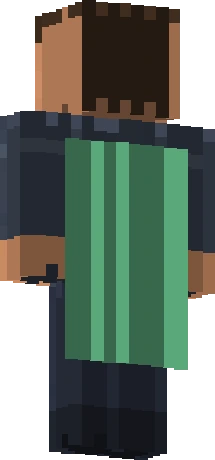
A cape featuring a TikTok-inspired design distributed during a joint promotional campaign between TikTok and Minecraft.
The TikTok Cape comes from a promotional crossover between TikTok and Minecraft, featuring a design inspired by the social platform. It was offered to eligible participants of that joint campaign rather than to the entire player base, so while it spread to a fair number of people who took part, it did not reach everyone, placing it in the uncommon tier. The cape is an example of Minecraft's brand partnerships, where an external platform teams up with the game to run a limited cosmetic giveaway. Its TikTok-themed styling makes it clearly a partnership item rather than a milestone or event cape.
How to Get the TikTok Cape
Awarded through a TikTok x Minecraft promotional crossover event for eligible participants.
The TikTok Cape is no longer obtainable. The window to earn it has closed, and Mojang does not sell or re-issue it. Buying or selling accounts to acquire it breaks Minecraft's usage rules. Players who already own it can keep using it.
History & Rarity
Minecraft has periodically partnered with major brands and platforms for limited promotions, and the TikTok crossover was one such campaign, surfacing around the 1.19 era. Eligible participants in the TikTok x Minecraft event were able to claim the cape during the promotional period. Because the campaign had specific eligibility and a limited window, its distribution was bounded, keeping the cape uncommon. Its history sits within Minecraft's broader pattern of cross-promotional partnerships rather than its in-house anniversary or convention traditions.
In rarity terms the TikTok Cape is classed as Uncommon. It became visible in the Java cape system around version 1.19, and it is currently no longer obtainable.
How to Equip the TikTok Cape
The TikTok Cape is granted to qualifying accounts and, on Java Edition, is selected from the cape carousel on the minecraft.net profile. It came from a time-limited partnership promotion.
On Java Edition, capes are managed from your minecraft.net profile, not from inside the game:
- Sign in at minecraft.net with the Microsoft account that owns the cape.
- Open your Minecraft: Java Edition profile page (Profile, then the skins/capes area).
- Find the cape carousel and select TikTok Cape.
- Save your selection; the cape appears on your character the next time you load the game.
Details
| Name | TikTok Cape |
| Rarity | Uncommon |
| Version Added | 1.19 |
| Available | No |
Frequently Asked Questions
Where did the TikTok Cape come from?
It was distributed through a TikTok x Minecraft promotional crossover campaign, a brand partnership between the social platform and the game, for eligible participants.
Why is the TikTok Cape uncommon rather than common?
It was only available to eligible participants of the limited crossover promotion during its window, rather than being granted to the entire player base, so its distribution was bounded.
Is the TikTok Cape still obtainable?
No. The promotional crossover ran for a limited time, so the cape can no longer be newly claimed.
How do I equip the TikTok Cape?
If your account received it on Java Edition, sign in at minecraft.net, open the Java profile, choose the TikTok Cape in the cape selector, and save.


