Tuxedo Creeper

Overview & Design
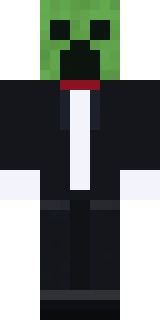
Tuxedo Creeper dresses Minecraft's most famous mob in formal black tie. The signature green Creeper face and skin are kept, but a black tuxedo jacket, white shirt front and a bow tie are painted over the body for an absurd contrast between explosive danger and fine dining. The gag is the mismatch, the friendliest possible outfit on the game's most hostile mob, and it stays funny from the back where the tuxedo tails are detailed.
It suits players who want a novelty meme skin with a formal twist for parties and comedic builds.
- Category
- meme
- Colour palette
- black, white and Creeper green
- Model type
- Steve (classic, 4px arms)
How to Use Tuxedo Creeper
Tuxedo Creeper works in both editions of Minecraft. Download the Steve (classic, 4px arms) PNG with the button above, then follow the steps for your edition.
Java Edition
- 1Click Download Skin above to save Tuxedo Creeper as a 64x64 PNG to your device.
- 2Open minecraft.net, sign in, and go to your profile under Skins (or use the Skins tab in the official launcher).
- 3Choose Upload Skin, pick the PNG, and set the model to Steve (classic, 4px arms).
- 4Save the change and start Java Edition. Only an account that owns Minecraft can change its skin.
Bedrock Edition
- 1Download Tuxedo Creeper with the button above. Bedrock imports skin files in the Windows version and on phones and tablets.
- 2Start Bedrock Edition and open the Dressing Room from the main menu.
- 3Go to the Classic Skins tab and import the PNG from your files or photo gallery.
- 4When the game asks which model the skin uses, choose classic, with arms four pixels wide.
Tips & Pairings
Matching capes
These official Minecraft capes complement the black, white and Creeper green of Tuxedo Creeper:
- Migrator Cape — Common
- Birthday Cape — Common
Similar styles
If you like Tuxedo Creeper, these skins share a similar vibe from other categories:
- Astro Explorer — astroworld
- Astro Miner — astroworld
- Astro Merchant — astroworld
Frequently Asked Questions
What is the Tuxedo Creeper skin?
It is a Creeper wearing a formal black tuxedo with a white shirt front and a bow tie. The green Creeper face is kept so the contrast between a dangerous mob and formal wear is the whole joke.
Is the Tuxedo Creeper a meme skin?
Yes. It is a novelty look built around the mismatch of a hostile Creeper in elegant black-tie attire, which makes it popular for parties, comedic builds and a laugh in chat.
Is the Tuxedo Creeper Minecraft skin free to download?
Yes. Every skin in the Astroworld gallery is free to download and use in both Java and Bedrock Edition. Just press the Download Skin button to save the PNG.
How do I install this skin in Minecraft Java Edition?
Download the PNG, then on minecraft.net or in the official launcher open your profile, choose Upload Skin, select the file and set the model to Steve (classic, 4px arms). Only an account that owns Minecraft can change its skin.
How do I use this skin on Minecraft Bedrock Edition?
In the Windows version or on a phone or tablet, open the Dressing Room, go to the Classic Skins tab and import the downloaded PNG. Choose Steve (classic, 4px arms) when the game asks for the model.
Made for Astroworld MC — download and use this skin on our server at play.astroworldmc.com

